Automated Failover with Cloudflare Workers
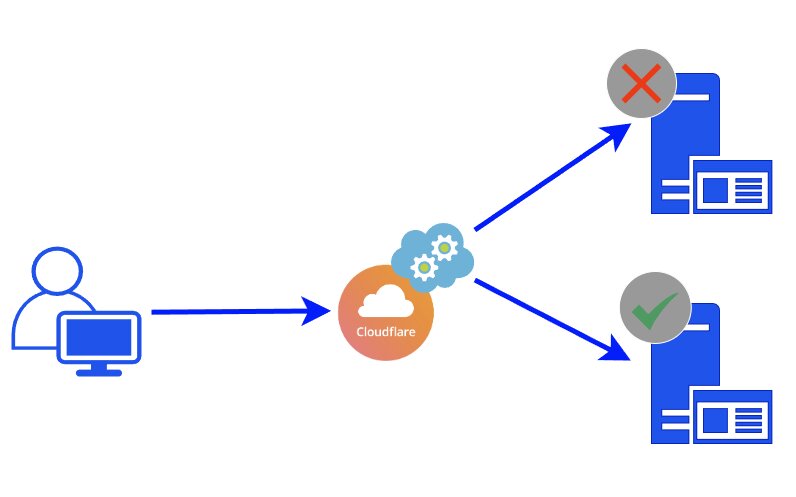
I manage a high-availability API service, `api.example.com`, that requires maximum uptime. This makes server maintenance, upgrades, and migrations challenging, as I cannot simply inform users of a multi-hour outage.
Initially, I set up a redundant API service on a second server with its own subdomain, `api2.example.com`. With proper NGINX configuration, this secondary server could accept requests for both domains. To perform maintenance, I would manually update the Cloudflare DNS settings for `api.example.com` to point to the secondary server's IP address. While this worked, it was a manual process, and DNS propagation delays meant the switch wasn't instantaneous.
I wanted to automate this failover process using Cloudflare Workers. Since Workers execute at the edge before DNS resolution, they can intercept requests, check the primary server's response, and route traffic accordingly. My goal was to check if the main server is healthy, and if not, automatically fallback to the secondary server.
It is important to note that this is not an HTTP redirect. The Cloudflare Worker intercepts the request and proxies it to the appropriate upstream server transparently.
Instructions
- DNS: Create proxied A records for
api.example.comandapi2.example.compointing to their respective origins. - Worker: Create a new worker and deploy the script below.
- Route: Add a route for
api.example.com/*pointing to the worker (Failure mode: Fail open).
export default {
    async fetch(request) {
        const primaryUrl = 'https://api.example.com';
        const fallbackUrl = 'https://api2.example.com';

        const url = new URL(request.url);
        const path = url.pathname + url.search;

        // Try primary
        try {
            const response = await fetch(primaryUrl + path, request);

            // If origin responds with a redirect (301/302), return it
            if ([301, 302].includes(response.status)) {
                return new Response(null, {
                    status: response.status,
                    headers: { 'Location': response.headers.get('Location') }
                });
            }

            // Otherwise, return normal response
            if (response.ok) {
                return response;
            }
        } catch (e) {
            console.error('Primary failed:', e);
        }

        // Fallback: try the same logic on secondary
        try {
            const response = await fetch(fallbackUrl + path, request);
            if ([301, 302].includes(response.status)) {
                return new Response(null, {
                    status: response.status,
                    headers: { 'Location': response.headers.get('Location') }
                });
            }
            return response;
        } catch (e) {
            console.error('Fallback failed:', e);
        }

        return new Response('Service unavailable', { status: 503 });
    }
};
Conclusion
That's it! Once the DNS entries are configured and the Worker is deployed, the failover logic operates automatically at the edge. This setup ensures that if your primary server goes down or needs maintenance, traffic is instantly routed to the backup server without any manual intervention or DNS propagation delays.
Recent blogs
- August 9th 2026 - DIY Smart TV Media Center Dashboard: Fullscreen App Launcher for Debian and Xfce
- June 11th 2026 - How to Nuke Your Gmail and Forward Messages to Proton
- May 12th 2026 - Self-Hosted Retro Gaming: RetroAssembly via Docker. Play your retro game collection on your Steam Deck
- All blog posts