Secure Your API: Restrict Access by Referer with Cloudflare
I run a public API that occasionally gets overwhelmed by high traffic from users misusing it. This prompted me to find a way to restrict access to certain endpoints, ensuring only legitimate requests from specific domains can get through.
In this tutorial, I'll show you how to set up a Cloudflare security rule to protect your API by limiting access based on the referring domain.
Setting Up the Rule
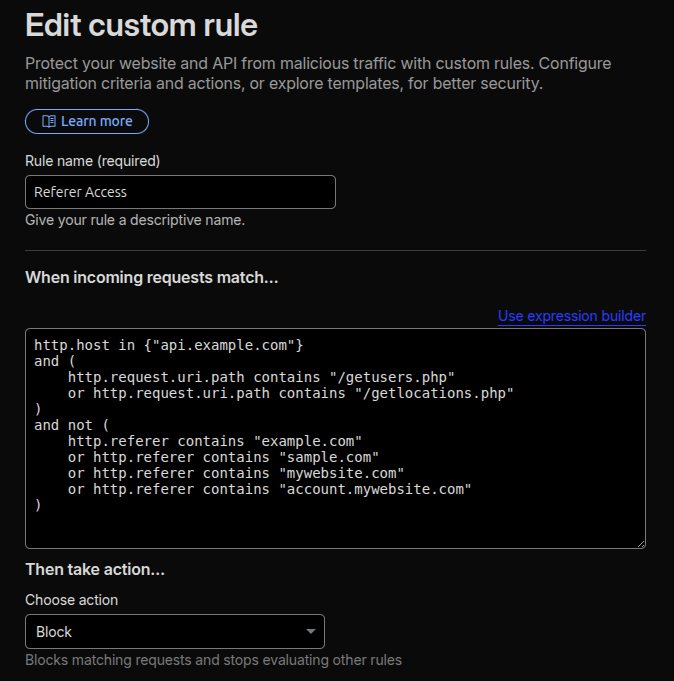
To get started, go to your Cloudflare dashboard and navigate to "Security > Security rules". Click "Create rule", give it a descriptive name like "Referer Access", and then click "Edit expression" to enter the rule manually. I find this is often faster than using the visual builder.
Copy and adapt the following expression for your specific needs:
http.host in {"api.example.com"}
and (
    http.request.uri.path contains "/getusers.php"
    or http.request.uri.path contains "/getlocations.php"
)
and not (
    http.referer contains "example.com"
    or http.referer contains "sample.com"
    or http.referer contains "mywebsite.com"
    or http.referer contains "account.mywebsite.com"
)
How It Works
This expression tells Cloudflare to block any request to `api.example.com` for the specified URI paths (`/getusers.php` or `/getlocations.php`) if the `Referer` header does NOT come from one of your whitelisted domains.
Set "Then take action…" to "Block".
When a request is blocked, the user sees a Cloudflare error page, and the traffic never hits your origin server. This is a powerful way to mitigate abuse, save bandwidth, and reduce server load.
**Disclaimer: Please be aware that this method is not 100% foolproof. The `Referer` header can be spoofed (faked) by knowledgeable users or scripts. However, for preventing general misuse and hotlinking, this rule is a valuable addition to your security toolkit.
Recent blogs
- August 9th 2026 - DIY Smart TV Media Center Dashboard: Fullscreen App Launcher for Debian and Xfce
- June 11th 2026 - How to Nuke Your Gmail and Forward Messages to Proton
- May 12th 2026 - Self-Hosted Retro Gaming: RetroAssembly via Docker. Play your retro game collection on your Steam Deck
- All blog posts